
USA Today
Read breaking news from anywhere.
Get free access to USA Today online using your Westerville Library card. Enjoy unlimited articles from the comfort of home or while on the go.
- Get a comprehensive overview of current events without clutter.
- Gain an understanding of complex topics with colorful infographics and digestible reporting.
- Stay informed about national news built for today's pace.
- Keep up to-do-date on sports, entertainment, finance, and technology.
What You Get
- View an exact replica of the print version in digital format via the image edition.
- Browse through the paper a page at a time or enter search terms to find specific articles.
- Read articles from January 3, 2006 to present day.

Read up on what's happening around the world while drinking your morning coffee with free access to USA Today.

More Options

Life in America
The Wall Street Journal [COMING SOON]
The New York Times [COMING SOON]
Trouble logging in?
-
By default, your PIN is the last four digits of your phone number. You can change this at any time for additional security.
-
Your library card number is located below the barcode on the back of your physical library card.


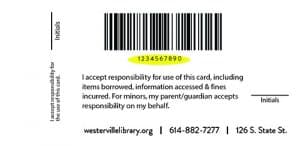
If you've temporarily misplaced or lost your library card, request your library card number via this form.
-
If you have lost or misplaced your library card, contact the library immediately to report it as lost or stolen:
- online via this form
- 614-882-7277 option 2
- in person
A replacement card will be mailed to your address on file.
To obtain information about your account or update your contact information, you must show your government-issued photo ID (or school ID with the current school year's date clearly indicated) at the welcome desk or contact your school delivery representative.
You are responsible for all items checked out on your library card, so make your report as soon as possible. There is no charge for replacing your card.
Note: Your library card number will change when it is replaced. This may affect your access to existing holds or items through the library's ebook services. This may also affect your access to your account balance for printing.
-
By default, your PIN is the last four digits of your phone number. You can change this at any time for additional security.
To change your PIN to a 4 to 8-digit number of your choice, follow these instructions:
- In person, bring your library card or picture ID to any service desk
- By phone, have your library card number and full name available. Then call 614-882-7277 option 2.
- Online, fill out this form. (Note: This option is only available if you have an email address on file with the library.)
-
The privacy of your library card account is a responsibility we take very seriously. For your protection and in accordance with Ohio law, you must provide proof of identification to receive information regarding your account.
For more information, refer to Library Policy Manual. Section: Releasing Library Account Information.