
Westerville News & Public Opinion
Discover Your City's History
Explore Westerville's history with keyword-searchable digital access to the local newspaper Westerville News & Public Opinion from 1880-2005.
- Find your parents' marriage announcement.
- Research the opposition and support for a city development opportunity.
- Discover the grand openings and closures of various stores and restaurants.
- Read the horoscope and weather for the day you were born.
Note: This resource is only accessible while in the library. Those looking to access the Public Opinion archive from home can do so with a paid subscription to Newspapers.com Publisher Extra.
What You Get
Access includes full-page scans of over 100,000 pages of newspaper articles, including photos and advertisements.
- Westerville Review (January 7, 1880-June 7, 1884)
- Central Ohio Review (June 14, 1884-May 2, 1885)
- Public Opinion (April 29, 1887-December 1993)
- Westerville News & Public Opinion (January 1994-March 2005)
Note: Westerville News & Public Opinion (March 2005-April 25, 2012) and ThisWeek Westerville News & Public Opinion (April 26, 2012-January 25, 2023) are still only available via print copies stored in the Westerville History Museum.

Whether you're looking for an ad published by your favorite restaurant of the past, or want to find your grandparent's wedding announcement, this is the best resource for local Westerville news available.


Westerville News & Public Opinion (1880-2005)

HelpNow for Writers

HelpNow for Job Seekers

HelpNow for Kids
Westerville News & Public Opinion (1880-2005)
HelpNow for Writers
HelpNow for Job Seekers
HelpNow for Kids
Trouble logging in?
-
By default, your PIN is the last four digits of your phone number. You can change this at any time for additional security.
-
Your library card number is located below the barcode on the back of your physical library card.


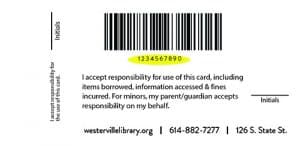
If you've temporarily misplaced or lost your library card, request your library card number via this form.
-
If you have lost or misplaced your library card, contact the library immediately to report it as lost or stolen:
- online via this form
- 614-882-7277 option 2
- in person
A replacement card will be mailed to your address on file.
To obtain information about your account or update your contact information, you must show your government-issued photo ID (or school ID with the current school year's date clearly indicated) at the welcome desk or contact your school delivery representative.
You are responsible for all items checked out on your library card, so make your report as soon as possible. There is no charge for replacing your card.
Note: Your library card number will change when it is replaced. This may affect your access to existing holds or items through the library's ebook services. This may also affect your access to your account balance for printing.
-
By default, your PIN is the last four digits of your phone number. You can change this at any time for additional security.
To change your PIN to a 4 to 8-digit number of your choice, follow these instructions:
- In person, bring your library card or picture ID to any service desk
- By phone, have your library card number and full name available. Then call 614-882-7277 option 2.
- Online, fill out this form. (Note: This option is only available if you have an email address on file with the library.)
-
The privacy of your library card account is a responsibility we take very seriously. For your protection and in accordance with Ohio law, you must provide proof of identification to receive information regarding your account.
For more information, refer to Library Policy Manual. Section: Releasing Library Account Information.
